
How to get the most out of every Wynter messaging test you run
Validate your messaging and find overlooked opportunities to improve website conversions for your B2B SaaS startup. By getting direct feedback from your ideal prospects.
Startups sourcing copy feedback on LinkedIn are my favorite pet peeve.
My issue with this approach: all it gets you is a tidal wave of opinions, best practices, and well-meaning edits that are shared by folks that are not your audience.
Instead, you can run guerilla message-testing by reaching out to your ideal prospects (find out more here), or you can use paid services to help you with that. For B2B SaaS, my favorite tool is Wynter.
Wynter puts your pages in front of people who match your ideal customer persona and guides them through a set of questions that help you understand what’s missing on the page, which messages resonate (or not), and even figure out whether you’re talking to the right audience.
A while back I wrote a guide on using Wynter based on what I’ve learned from running messaging tests for my clients and experiences of folks willing to share their tips on getting the most out of every test.
You can read the updated version on that guide below.
Here’s what’s inside:
>> Why consider running a messaging test in the first place <<
>> When it’s too early to message-test <<
>> What you can expect to get out of it (when done right) <<
>> How to decide if you need a messaging test <<
>> 11 steps to run a test that helps you go beyond surface-level feedback <<
>> How to prep your page for testing <<
>> How to analyze the responses to actually optimize your web pages <<
Why you may want to run a messaging test
You have frameworks. You have settled on your key messaging points, value props, and feature descriptions internally, possibly after weeks of revisions.
Shouldn’t this be enough?
You would think so.
And yet, many B2B SaaS startups have websites that are too generic, don’t share enough information about the product features or the use cases, or sound like every other SaaS startup out there.
For example, most of the pages featured in the “Do You Even Resonate?” series don’t answer questions you would expect to see resolved right in the hero section, such as:
“What does your product do?”
“How is it different?” and
“Can you prove you can deliver on the claims you make?”
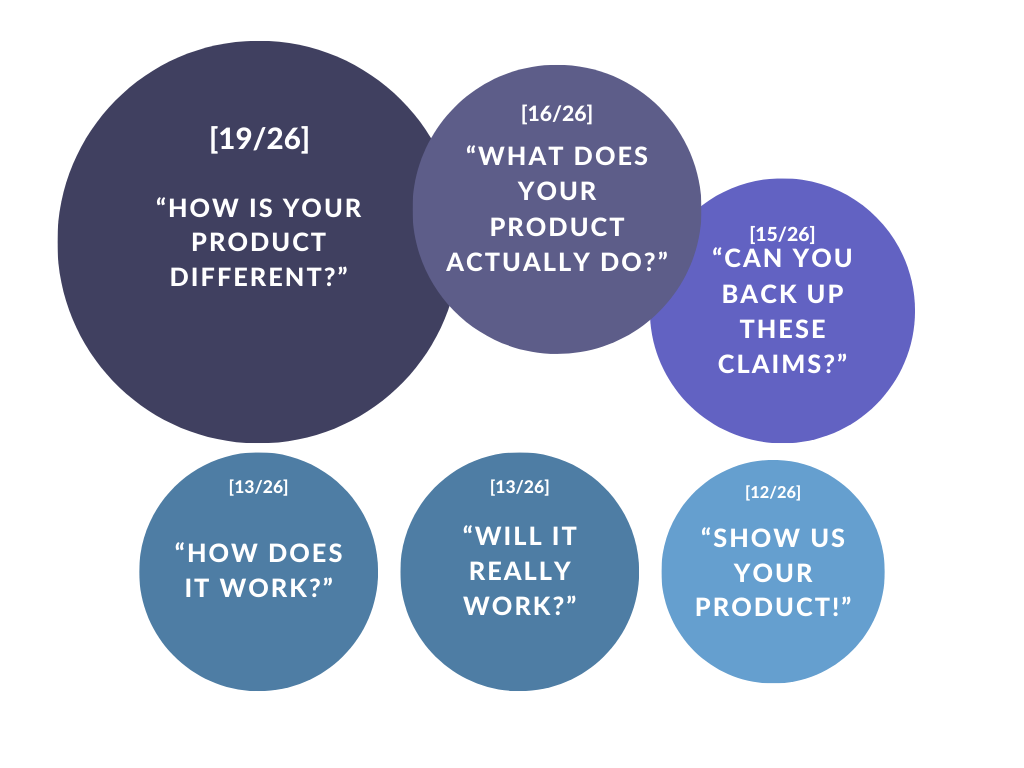
Review panelists had the same questions on most of the 26 homepages. Starting with “How is your product different?” and even “So… what does it actually do?”
In my experience, it's not the lack of frameworks or “How to guides” on building a solid homepage that leads to it.
Most of it comes down to the challenge of writing for yourself (or your product).
Here’s what I see happen:
Assumptions replace (most of) research for messaging decisions
The curse of insider knowledge makes it hard to write for your prospects
Startups run into unexpected glitches with execution
Internal blind spots get in the way of growth
[1] Assumptions replacing research
Unless you’re following a customer-research-based process, it’s very likely that your web copy is to some extent based on assumptions. In itself, this is not a problem — there’s no way you can possibly remove all of the guesswork.
The problems start when there’s more guesswork than data. Or when you’re not aware which parts are which.
Message testing can help validate assumptions and course-correct before you go live.
If you’ve been mostly guessing about what would work, it’s probably not worth setting up a messaging test. Instead of that, you could try:
Running a survey to clarify your messaging and feature hierarchy
Talking to existing customers to understand why they chose your product and how they got to the point of conversion
Talking to potential customers to understand how they think about the challenge you’re solving and how they choose solutions
Getting feedback from your ICPs on the page where they talk through their reaction to your page – and, most importantly, where you get to ask them follow-up questions
This is especially important for startups taking big swings against established competitors or making tone-of-voice bets to stand out.
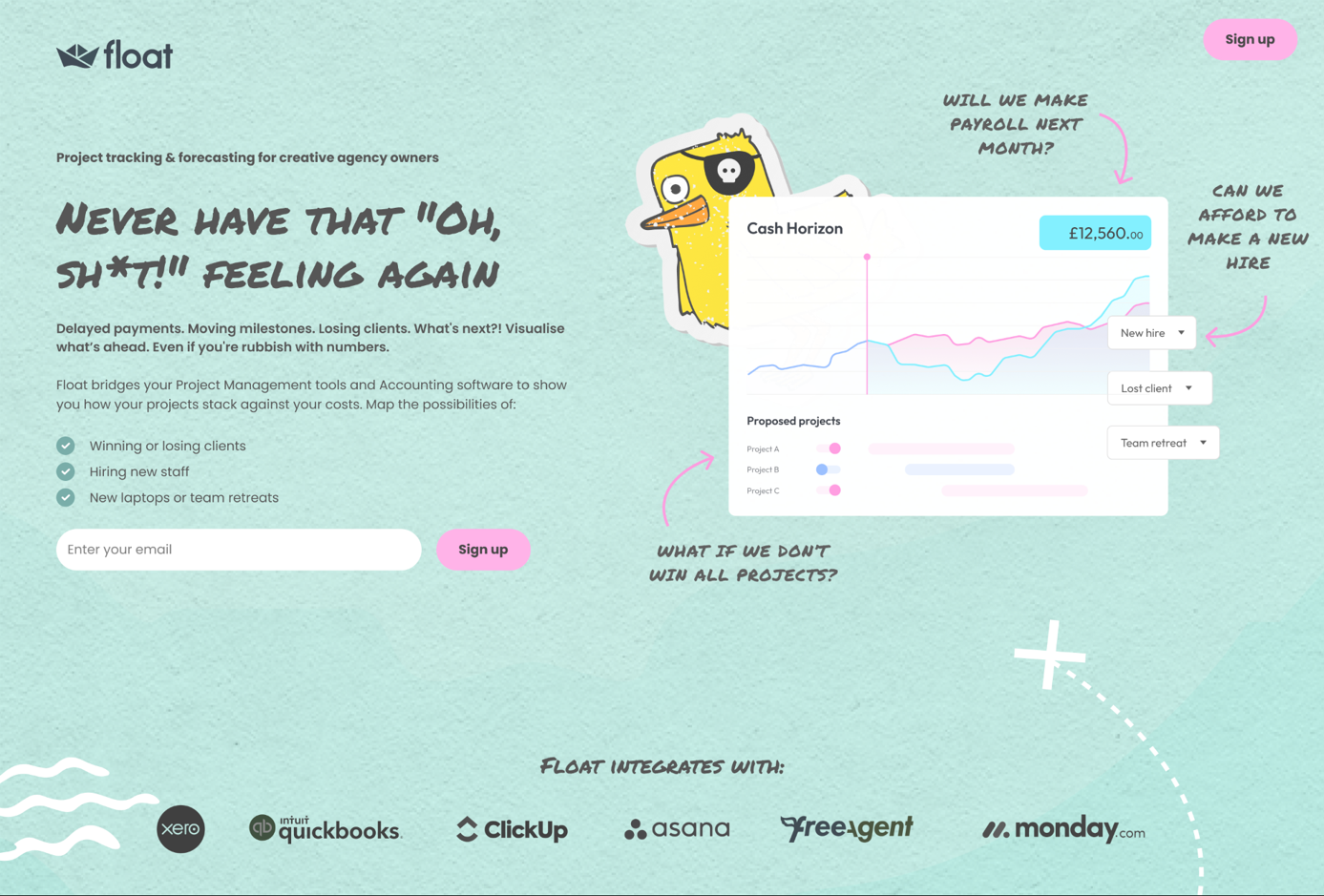
For example, in this project for Float, we tested both targeting a new audience and using a bolder brand voice.
[2] The curse of insider knowledge
You know your product inside and out and, quite frankly, can’t imagine why your ICPs would not want to buy it.
Fair enough.
The challenge is: your prospects aren’t sure they need to spend even as much as 10 seconds on your website.
And even with customer research and copywriting frameworks at your disposal, it can be hard to shift gears and write copy for people who don’t necessarily believe that your product is the right solution for them.
Getting (admittedly, sometimes brutal) feedback from your ICPs can help pinpoint where exactly you over-hype your product, sound out of touch with the industry, or forget to add proof points that would help your audience trust you.
For example, many startup websites tend to include only high-level details of their product capabilities.
Some audiences (especially early adopters) may be happy to jump right in and figure it our for themselves. More mature audiences will likely want to know how your product works — and, even more importantly, how it would work with their tech stack.
Message-testing can help you see when you’re not sharing the info your ICPs need from you to convert.
“I was looking to receive answers to three primary questions:
1. Was it clear what our software did?
2. Was the value of our software clear to our ICP?
3. Were those two elements strong enough for our ICP to want to find out more about Zoovu?
All three of those questions were answered.
The most surprising insights were about what information our ICP was most looking for right away. Our use case was clear and they wanted to know more about our differentiation (which wasn’t a surprise), but they also wanted to jump right into the ‘how’ of our platform.
They wanted to understand how our AI worked and how we integrated with other systems, which was a surprise not only in how soon they wanted to know how the product worked, but which parts of the product, as those two elements are not what we’ve traditionally highlighted.”

Marc Cousineau
Director of Content at Zoovu
[3] Unexpected glitches with execution
Lastly, conversion copywriting is a skill of translating customer research into words on the page to guide prospects from “Eh” to “I need to check this out.”
And while you can definitely map out a page structure without getting into the nitty gritty of “How do I word,” you’ll need to deal with that part eventually.
For B2B SaaS, the biggest issues I see over and over are:
Having copy overrun with buzzwords and fluff
Not developing a distinctive tone of voice
Defaulting to overblown claims
Assuming that “nobody reads copy” and writing like you’re Figma (you’re not)
This is connected to clarity on differentiators, and grounding your messaging in customer research. But even if you have that figured out, sometimes they don’t translate into copy as seamlessly as you hoped.
Fortunately, your target audience will be happy to tell you when they think you’re being condescending, sound ridiculous, or write fluffy headlines.
(And if your headline resonates with them, they’ll let you know too.)
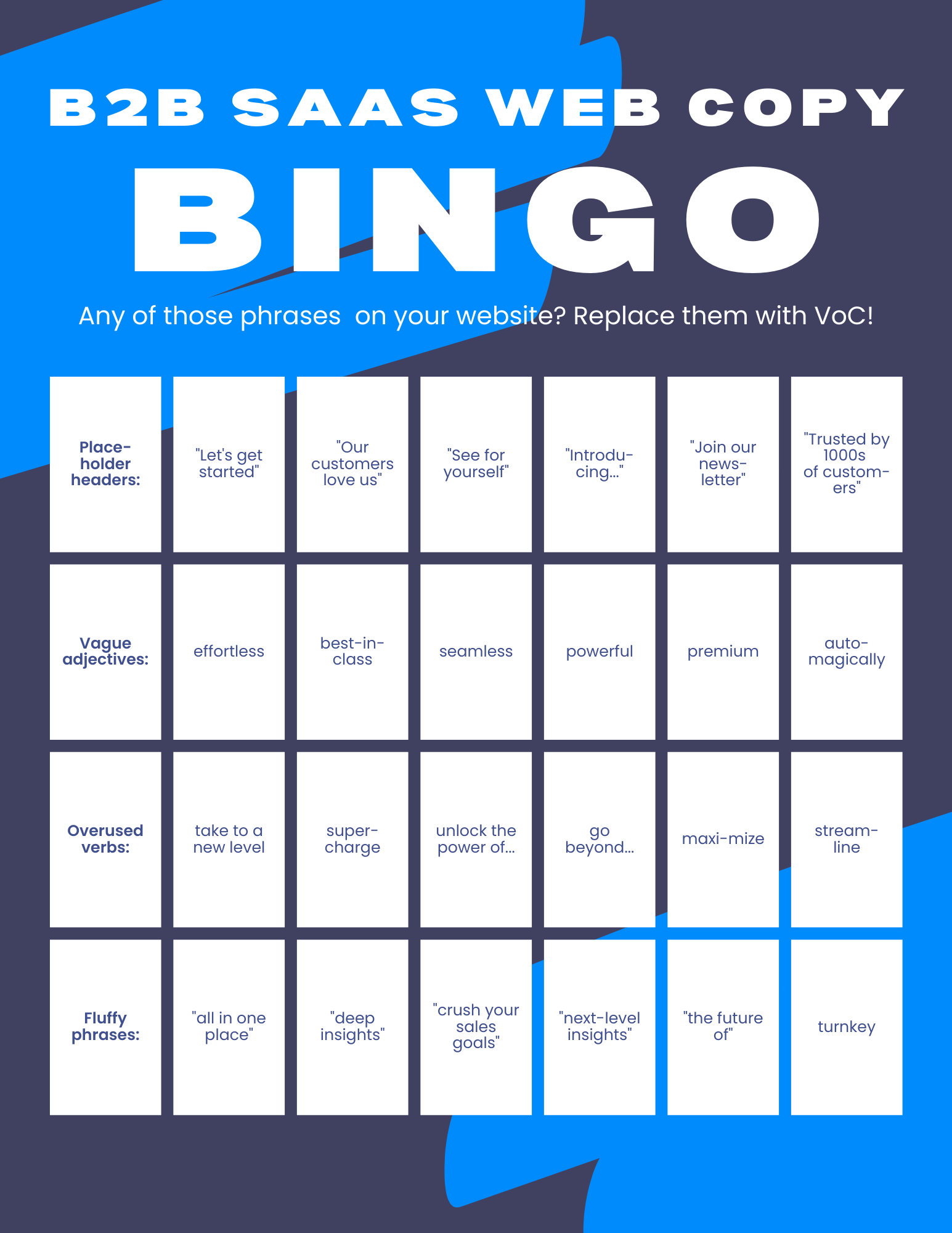
Finding out if your audience wants to read about the future of their industry or getting supercharged is definitely something that message testing can help with.
Another example would be finding out the easy way (before launch), that your category creation play isn’t making sense to your audience.
In one of my projects, it became clear that outside of the early adopter group, panelists were taking as a given a slightly different set of capabilities and use cases, just based on the way the product category was presented.
[4] Internal blind spots
As startups grow, internal knowledge becomes siloed and it can be hard to get a complete picture of customer journey, step by step.
Especially if you rely on internal data as a shortcut to faster copy, you’ll find blind spots.
As with assumptions, it’s a reality of being a startup. The challenge is that especially with market changes or shifts to a different audience segment, these blind spots can become a barrier to growth.
Message testing can help evaluate new copy without having to wait for months on website performance stats.
“We use Wynter to gather feedback on homepage and solution [pages] while doing page redesigns, as well as big copy/messaging updates and incorporate qualitative insights into new page iterations.
Interestingly, the feedback from Wynter revealed highly relevant points that hadn’t been raised by anyone internally”

David Pires
B2B Saas Marketing Leader - Europe
What you can expect to get out of a messaging test (when done right)
There are at least 4 reasons to consider setting up a messaging test to get qualitative feedback from your ideal prospects.
These responses can help you figure out:
Which headlines are not specific enough to keep your readers on the page
Which claims are not perceived as credible because there’s not enough proof on the page or they’re too vague
Where you still have friction points where prospects’ hesitations that haven’t been addressed in the copy
Instances where your readers have to guess what your product does (and they’re guessing wrong)
What’s missing from your generic or unclear CTAs
When your copy appears to be too cute, gimmicky, or even obnoxious
They can also show you what works well:
Problem statements and claims you can lean into
Impactful big ideas or messages that can be used across all channels
Elements of social proof your ICPs find to be especially credible
Getting direct ICP feedback can help you see what works and what doesn’t work on the page, skipping months of trial and error.
How to decide if you need to run a messaging test
Message-testing can tell you what doesn’t work.
But it doesn’t tell you why.
I don’t recommend running messaging tests if you’re guessing what to put on the page or if you’re expecting one messaging test to magically fix every possible issue.
This is when running a messaging test can be helpful:
Your existing pages are not performing well, but you don’t know what exactly is broken
You’re about to launch core website pages and want to make sure they’ll perform well once they’re live
You’re considering a new, bold brand voice, and want to get ICP feedback before making that change
You’re updating messaging and want to make sure it’ll resonate with your prospects
You’re expanding to a new industry or a new use case and want to get ICP feedback before rolling out your outreach or paid ads
Here are some signs that your web page(s) can be optimized:
Repeated questions during sales calls that ideally should have been answered earlier
Getting prospects that don’t match your ideal audience
Session recordings that suggest that visitors are looking for info that’s not there (U-turns, rage clicks and a lot of scrolling are a good place to start exploring those patterns)
Low scroll depth on pages and/or high bounce rates or drop-offs on core website pages
Basically, what it comes down to is moving fast and de-risking copy and messaging decisions by getting direct feedback from your target audience.
If that sounds like the right thing for your startup, the next step is making sure you don’t waste your budget.
Read on to find out how to prep your page for testing, get useful feedback, and make sure you get the most out of participants’ responses.
How to run message-testing (including response analysis)
4 phases for any type of feedback gathering
This approach is generic enough that it'll work even with a quick video call where your interviewees take a look at your copy as you share your screen.
As long as you have something for them to look at, you should be all set.
I’m sharing specific steps for Wynter message testing below.
Phase 1: Research
Answering the question: what do we know about our prospects and how does that translate into messaging?
Converting messaging is based on what ICPs need to hear, not what we want to say.
So you need to make sure that the copy is aligned with that — otherwise, you’ll be getting back responses like “I don’t know why I should care” or “This is not something I’d use.”
In practical terms, it means understanding why customers should care about the features, the brand promise, or the next step towards conversions — and then anticipating their objections and hesitations.
You may not be able to anticipate all of them, which is why you’re running the test.
Phase 2: Page prep
Answering the question: will our panelists be able to see everything they need? Is the copy the best it can be (for the purposes of the test)?
This means checking for:
design issues (like those nifty tabs many startups use for features where you have to click on the tab to see the copy — those won’t be clickable in a test), and
copy issues (like placeholder headlines — “Don’t take our word for it” — or missing sections like feature overview)
This way we can be sure we’re getting high-quality feedback, not “I want to see the product” non-responses.
Phase 3: Analyzing results
Answering the question: what have we learned about the way our messaging is perceived by the target audience?
Technically, AI could do the sorting part for you. Or write a summary.
Practically, I found them too high-level to be helpful. Remember, you still need to go from “stuff respondents said” to “stuff we’re going to do to improve conversions.” And tips like “You should improve the clarity of your page” are not particularly useful.
Below, I’ll show how I go through the responses and share my template for turning them into page updates.
Phase 4: Optimization
Now that you know what your target audience finds confusing, where they need more information, or when they disagree with the way you talk about their goals and desires, you can fix those issues!
For example, you can:
Add more credibility signals if your claims seem too good to be true
Insert a pricing section that respondents asked for
Update website design and visuals
Rethink your tone of voice if it landed flat with your audience
Ideally, you’re not discovering hard-to-fix issues at this point. Instead, you’re updating the messaging based on the feedback of folks that are the toughest audience — ICPs that are not shopping around for a solution.
(If you get feedback like “This is exactly what I’ve been looking for” or “Probably the best page I’ve reviewed so far,” you’re onto something.)
11 steps for prepping a Wynter messaging test
In this case, we’re prepping the page for a specific testing format. And since you’re not engaging with the participants, you want to make sure that your copy can definitely stand on its own and that you’ll get more than surface-level feedback.

11 steps to prep, run, and analyze your Wynter messaging test
This is how I run my tests:
Prep:
If the page isn’t following best practices, fix that.
Make sure all of the copy will be visible on a static page.
Decide which sections we want to test (and why).
What are we trying to learn? Make a list of the hypotheses and questions we hope to answer.
Running the test:
Make sure you have enough panelists
Kick off the test for the right audience
Pick the aligned with your goals
Analysis:
Look at the scores as a benchmark.
Dig into the qualitative responses to find themes (good and bad).
Did panel responses answer our questions or validate hypotheses?
Anything left unclear? What can we already execute on?
[1] Setting up your Wynter test
Setup is the easiest step:
Make sure your audience is available on Wynter
Choose the best-fit set of questions
Select page sections that you want to test
Describe the page context for your panelists
My favorite thing about running tests on Wynter is that you get to be very specific in who you want to see on your panel.
As opposed to more generic user testing solutions, you can define roles and industries.
Or get even more specific:
“I needed to be able to segment users who use GitHub or have GitHub experience, which honestly I think many do these days, but I needed that specific data point. When I reached out to Wynter, the team ensured that the selected panelists were the right fit.”

Mariana Racasan
Product Marketing Strategist
[2] Prepping your page for message testing
If you’re looking for optimization opportunities for an existing, reasonably well-performing page that doesn’t have any interactive sections, that’s going to get you the data you need.
But in some cases, it’s worth updating your page to get better feedback.
3 cases when you’ll want to rework your page first:
Testing “aspirational” pages
“Aspirational” pages (especially homepages) are all about the founders' vision, but don’t offer a lot of information about the actual product. But you can’t get any meaningful feedback on your copy if it doesn’t include any product details.
Testing “feature dump” pages
Many industry and/or ICP pages end up written from the feature-first perspective. That means that the readers have to do all the work. In my experience, that only gets you surface-level feedback from the panelists, but not the deeper insights you need to make impactful copy changes.
Testing for confirmation instead of insights
If you already have a list of changes you think will get the page to perform better, I’d recommend running a test on the improved V2, instead of wasting a test on V1 that you already know you need to fix.
This way you can take some creative or messaging risks and get feedback from your audience.
For example, you could add a CTA section that goes against industry conventions (like funneling everyone into a demo) to see how your prospects would react.
Defining “ready” for the purposes of the test
You’ll want to make sure that the pages you test are as close to the final design as possible.
This way, you don’t get back respondents mentioning “sloppy design” over, and over, and over again. And, you get their reactions to your actual design, so that you can tweak it if necessary.
Your respondents will only see a static screenshot, so you want to make sure they see the copy you want them to read. This will affect pages with:
Videos (demos, case studies)
Interactive elements (demo walthkthroughs, mouse-over elements)
Carousels (testimonials, case studies)
Accordions (FAQs, feature clusters)
If those visuals are supporting a strong text-based page, you may be able to get away with not making any changes. If interactive elements are hiding key information, like use case or feature description, you’ll want to create a mockup that displays that info.
For the actual copy and messaging, they doesn’t have to be 100% finalized.
I’d shoot for 75-80% there, so that your audience doesn’t feel like they’re reviewing the first draft (which will make them say unhelpful things like “I feel it wasn’t written by a native speaker” or “Only AI uses m-dashes”).
At a minimum, your page covers:
Product differentiation
Description of what your product does
Proof that it works
Description of how it works
Product screenshots
Going beyond that, you’ll want to make sure that the page you’re testing is credible, specific and ICP-focused.
Credibility
Claims are supported by some form of proof
There are logos and testimonials (and/or case studies)
Readers don’t need to suspend disbelief to get on board with your positioning or industry PoV
Specificity
Readers can actually see your product
They can see how the product and/or individual features work
Headlines, CTAs and copy in general are connected to your ICP’s pain points and goals
Focus on your ICP
Copy is about your ICP, not your product or your startup
It answers “Why should I care?” throughout the page
It makes it easy to say “yes” by removing unnecessary friction and giving readers appropriate incentives to act
Grab the checklist (PDF or spreadsheet) to get in-depth feedback from your panelists.
“The options to submit the landing page you want to test are to provide the URL or a screenshot. When you provide the URL, Wynter’s just taking a screen grab of the page.
One of the sections on my page was an accordion, requiring interaction from the end user, so unfortunately I got no useful feedback there.”

Kara Tegha
VP of Marketing at Entrio
Document why you’re even running the test
(and what you’re hoping to learn)
When setting up a Wynter test, you’ll be able to select a set of questions based on your overall goal and choose specific page segments that you want feedback on.
This is a great starting point — especially if you’re looking for CRO opportunities on a solid page.
But I find that I get more mileage out of responses if I’m more specific than that and have a more formal “This is what we’re doing and why.”
Is it because I’m an overthinker?
Probably.
But it also helps me decide in advance what I need to focus on — and what I want the panelists to respond to.
Here are some hypothetical examples.
Hero section
“We know that X% of the page visitors don’t scroll past the hero section and X% leave the page. Our hypothesis is that the hero section copy is too generic and that replacing the copy with a more specific breakdown (including who it’s for, primary use case, and the value prop) will increase prospects’ willingness to keep reading about the product. We’ll know that this hypothesis is correct based on the “Willingness to keep reading” score and qualitative feedback from our panelists.”
Features / “How it works” section
“From session recordings, we know that the page visitors pause their scroll here and read the section. But they don’t click on the section CTA and X% of them leave the page without taking any action. Our hypothesis is that we’re not providing enough information in this section and that conversions will improve if we add feature <> benefit <> outcome details in the section. Based on the feedback from the sales team, prospects want to know (list of questions). We’ll include (list of changes) in this section. We’ll know our hypothesis is correct if we see a higher willingness to schedule a demo, don’t see these objections repeated in responses, and get positive qualitative feedback from our panelists.”
Pricing section
“From closed-lost and closed-won interviews, we know that prospects evaluate our pricing compared to competitors X, Y, and Z and that when they’re making a decision, they consider (list). The interviews suggest that our best customers choose the following plans for these reasons. Our current pricing page includes plan overview and feature breakdowns, but doesn’t reflect those reasons back to the readers or address common objections referenced by the sales team. Our hypothesis is that replacing placeholder headline and subheadline and expanding the plan descriptions to include the “Best for…” information will help us increase signups for plans and attract more of the best-fit prospects. We’ll know our hypothesis is correct if we see a higher willingness to schedule a demo, don’t see these objections repeated in responses, and get positive qualitative feedback from our panelists.”
Call to action section
“We know that X% of the page visitors scroll to the CTA section, but only X% of them click on the CTA button. Our hypothesis is that our readers need additional information about the next steps to reduce friction. Based on the exit intent survey, our readers hesitate because (list of reasons). In the updated CTA section, we’ll address them as follows: (new copy). We’ll know our hypothesis is correct if we see a higher willingness to schedule a demo, don’t see these objections repeated in responses, and get positive qualitative feedback from our panelists.”
Here’s why I think it’s worth spending time on thinking this through instead of throwing a page into Wynter to see what comes out:
Here’s why it’s worth spending time on thinking this through instead of throwing a page into Wynter to see what comes out:
It forces you to slow down and think about the changes you’re making to the page
It reduces the amount of editing by committee and guesswork
You can separate the signal from the noise in responses
You can also create a list of unanswered questions that you’re hoping to answer by running the messaging test. You may not get answers to all of them.
But if you document them in advance, you’re more likely to look for answers and patterns in panelists’ responses.
[3] Analyzing test results
At the end of the test, you’ll have access to quant scores for each section and the page overall, and to qualitative feedback.
The fun part here is getting from 15 or more different opinions on your page to a specific list of to-do items. You may be tempted to skim the responses, check the section scores, and move right into editing. I recommend reading through the responses and then sorting them by themes, including counting frequencies.
Here’s why it’s worth spending time on qual data analysis:
Scores don’t tell the whole story
Scores are good as a baseline, but they don’t show you the whole picture. For example, if your panelists misinterpreted the copy, their high scores don’t matter.
In my projects, I’ve seen these outcomes:
Discovering that product category stated on the page led panelists to make incorrect assumptions about the product
Realizing that the primary paint point agitated on the page was perceived as a mild nuisance, at best
Finding out that the company point of view wasn’t aligned with what prospects believed to be true about their industry
Sorting responses helps prevent biases
You may also be tempted to disregard hard-to-implement changes and/or place less emphasis on responses you’ve read first compared to the ones you’ve read more recently. And there’s always the temptation to ignore feedback you didn’t like or only focus on glowing feedback.
(Side note on biases:
Sometimes the biggest gift of all of running a messaging test is realizing that you were wrong about *everything*.
Think about long-term bets that only pay off if you get initial traction:
Category-building
GTM motion targeting one specific industry
Messaging that highlights your unique point of view
If your initial assumptions about what would resonate with your audience are off, those bets will not lead to success. Sometimes finding out that your page is built on wrong assumptions is the best possible outcome.)
Panelists’ responses can help you find better words
Pain points described in a visceral way.
Complaints about competitors’ solutions.
Snarky comments on claims you thought were perfectly fine (if that’s aligned with your brand voice).
Just as any source of voice-of-customer data, it’s worth going through every line to find copy ideas.
Analyzing responses to find copy and messaging optimization ideas
How to decide which responses to pay attention to
In an ideal world, every response you get is at least a paragraph long, answers all of your questions about your prospects’ motivations and pain points, and gives you a clear roadmap towards a better, higher-converting copy.
Realistically, you’ll probably get some responses that won’t be very helpful.
That mostly happens when participants get sidetracked or decide to critique your copy instead of sharing their reaction to it. Even those can turn out to be helpful.
For example, if half of your respondents say your copy is “pushy,” you’ll want to tone down your brand voice.
Beyond that, it’s mostly about making sure you don’t miss anything important — and also don’t overestimate the importance of any particular response.
I do it the old-fashioned way: with spreadsheets!
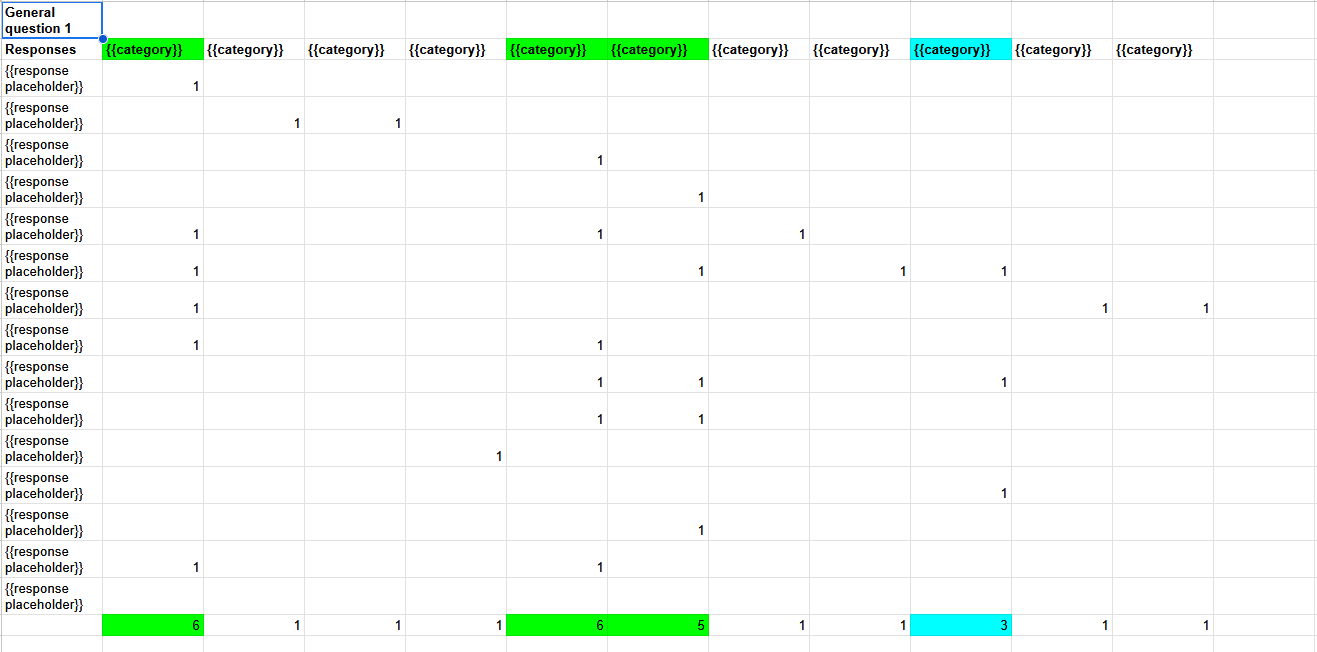
A peek behind the scenes: one of the tabs for analyzing panelists’ responses to go from “stuff they said” to “what it means for the website.” Grab the whole thing here.
If you hate spreadsheets, you can come up with a system of your own.
Once you have a better understanding of what your respondents thought of your page, you can map them against your hypotheses and see if you were correct.
If not, at least now you should be able to figure out what to do next and how to optimize your page.
How to decide if you need to run a test on your updated page
I’ve had projects when we ran several tests to make sure that the changes were moving the needle in the right direction.
You shouldn’t need to re-test an updated page if you’ve been optimizing an already solid page.
It might be worth running the test if you ended up re-writing the whole thing or if you’ve realized that your initial assumptions about your audience didn’t survive the first contact with the reality.
(Which means you shouldn’t have been running the test in the first place.)
“I think there is no point in doing a message test if you don’t know what you’re looking for. Are you looking to validate your way of thinking or do you just want to see what people get out of this statement? We knew exactly what we wanted to test, so we were happy with the results.”
Mariana Racasan
Product Marketing Strategist
That was a lot. Since you’ve made it this far, here’s a recap
Message testing is way better than asking LinkedIn randos for “brutal feedback” (even if some of those randos write copy for a living, they still don’t have any context for their recommendations, so you get either opinions or best practices)
Asking your (cold) ICPs for feedback is much better — if you do it right. Message tests can help you figure out when your copy is too vague, your messaging fails to resonate, and your pages don’t provide vital info (like “what does your product do for me, again?”).
You can get much more out of your messaging tests if you don’t simply throw pages in to see what comes back, and instead:
prep wireframes
build hypotheses
strategically update copy
analyze every response
connect the results to on-page improvements
Got a question on setting up your startup’s messaging test that I haven’t answered?
Send it my way through this form:

Ekaterina (Sam) Howard, conversion copywriter and strategist for B2B SaaS startups and scaleups
Hi, I’m Sam, a conversion copywriter and strategist for B2B SaaS startups
I help post-PMF startups attract and convert more of their ICPs by building core website pages that positions them as the obvious solution for their target audience.
Find out more about building your highly-converting website pages in 8 weeks.